 Tersby
Which sites have languages
Several languages are available on sites made on the «Blank site» template, that is, built entirely in expert mode. A site on a regular template has one language: for another language, make a copy of the site.
Each language opens at its own address: the main one at the site's address, the others with the language code, for example /en and /en/about.
Add a language
- In expert mode open “Pages”. The «Site languages» block is at the top.
- Press «+ Add a language» and pick one from the list (almost ninety of them).
- The new language is created as a copy of the whole site: pages, popups, header and footer. All that's left is translating the texts.
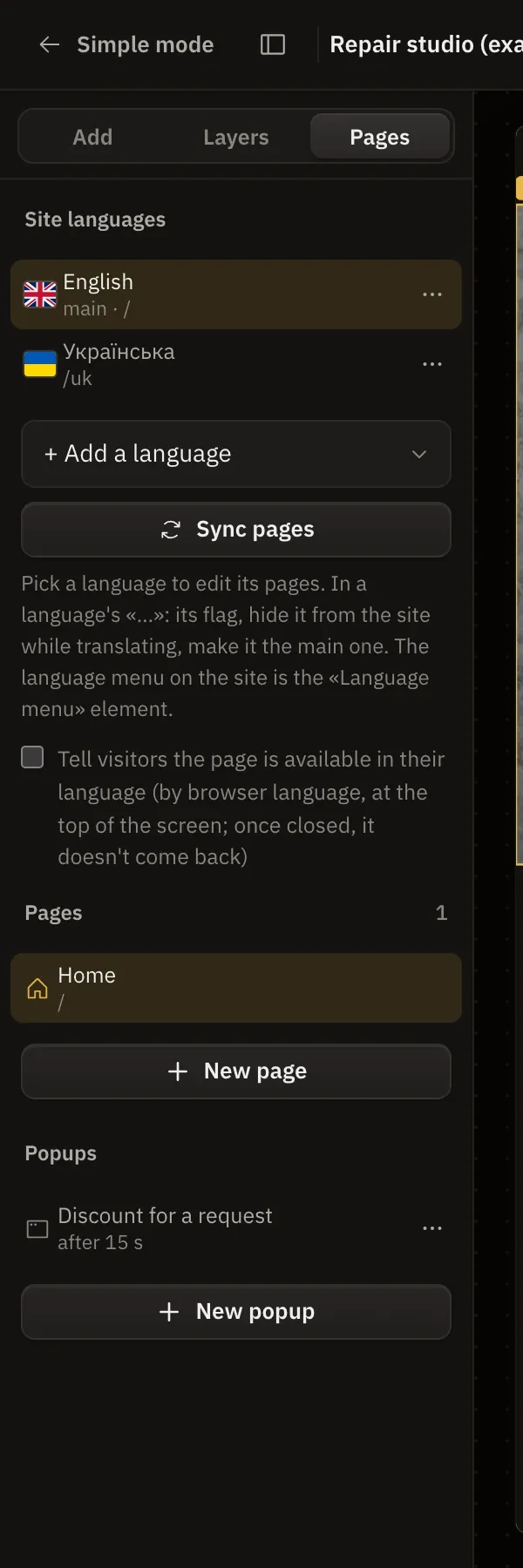
Press a language to edit its pages. The canvas and the page list switch to that version.
Translate with Tersy
Pick the language and press «Translate with Tersy». Tersy translates all of that version's texts: headings, texts, buttons, form fields, list items, tables, the title and description for search. Links, promo codes, prices and numbers stay as they were.
Translation uses Tersy credits by volume, usually 1-5. If you don't like the result, ⌘Z brings the texts back in one step. Look the pages over afterwards: Tersy translates well, but names and jokes are worth checking yourself.
Hide a language while translating
In the language's «…» choose «Hide from the site». Its addresses won't open, and it won't be in the language menu or in search engines. When the translation is ready, press «Show on the site».
The language switch
Add the «Language menu» element to the header (or take a ready header with languages in “Add” → «Sections» → «Header»). The menu leads to the same page in another language. Its settings:
- look: a dropdown or a row;
- label: the code (EN), the name (English) or just the flag;
- which languages to show.
A language's flag is changed in «…» → «Icon…»: any from the set, your own picture or no flag.
Pages in different languages
- Pages link between languages by themselves. The language menu on «About us» leads to «About us» in the other language.
- «Sync pages» adds to every language the pages it's missing (as copies to translate).
- A page's «…» has «Copy to other languages».
- In a page's settings you can set its translation by hand or mark that there's none.
Search engines
Each version gets its own language in the page's code, and search engines see the links between translations (hreflang). All languages go into the sitemap. The home page's title and description for search are set separately for each language.
A hint for visitors
The «Tell visitors the page is available in their language» checkbox shows a small strip at the top to a person whose browser is set to another of the site's languages: «This page is available in your language» and a button to go there. The strip is in the visitor's language, never redirects anyone by itself and doesn't come back once closed.
The main language
A language's «…» has «Make it main»: it opens at the site's address, and the former main language moves to its code. «Change the main language…» on the main language only renames it, moving nothing.